Total Commander
Screenshots
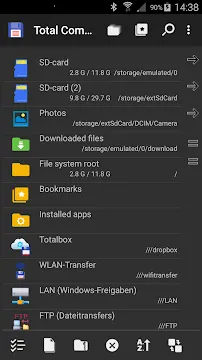
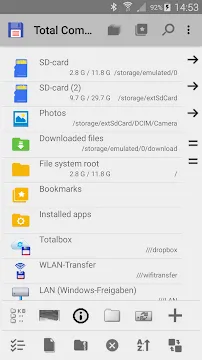
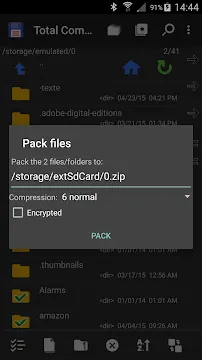
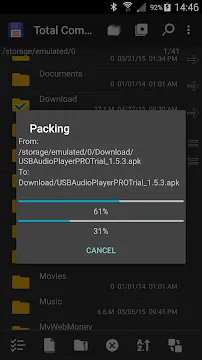
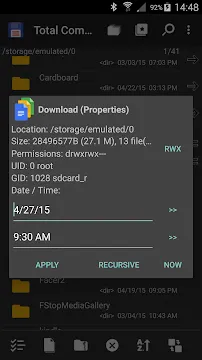
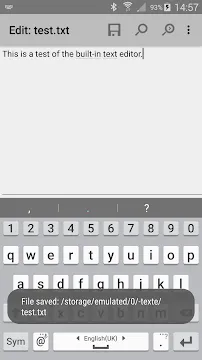
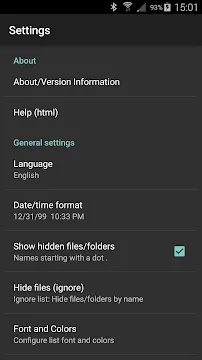
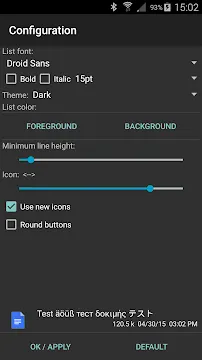
Total Commander is a robust file management tool designed to give users absolute control over their local storage. It brings a classic, desktop-style organization system directly to mobile devices. Instead of using oversimplified interfaces that hide your data, this software displays your files clearly. It easily handles regular file actions like copying, moving, deleting, and renaming. The application focuses purely on functionality and speed without distracting you with unnecessary visual clutter. It serves users who need to manage deep directories, system files, or compressed archives efficiently. By relying on a practical and clean layout, the tool turns complex data management into a straightforward process.
Understanding the Dual Panel Interface of Total Commander
The defining characteristic of Total Commander is its highly practical dual-panel interface. This layout splits your screen into two distinct file navigation windows side-by-side or stacked vertically. You can look at two different folders at the exact same time without switching screens. This design speeds up data transfers significantly compared to traditional single-window apps.
To move a file, you simply select it in one panel and click the copy or move button. The software automatically sends the file directly to the directory open in the second panel. This setup eliminates the tedious process of copying an item, navigating backward, opening a new folder, and pasting it. Transitioning between panels requires just a quick swipe or a tap, making large data organization tasks incredibly fast and fluid.
How to Optimize Local Storage via Total Commander
Keeping your device clean is simple when you use the built-in search and filtering tools. The Total Commander search engine allows you to find items based on specific parameters. You can look for files by text content, creation date, or file size rather than just typing a name. This capability helps you locate hidden cache files or forgotten downloads that eat up valuable space.
Additionally, the software calculates folder sizes on demand. Many standard managers only show the size of individual files, hiding how much space a deep directory actually occupies. By pressing and holding a folder, you can see its exact impact on your storage layout. This accurate data allows you to target major space hogs and delete them safely. Regularly monitoring your storage with these tools keeps your operating system running smoothly.
Key Features for Advanced Data Management
The application packs an incredible variety of features beneath its minimalist look. It caters heavily to power users who need advanced connectivity and system-level access. Here are some of the most notable features you will encounter:
- ZIP and RAR Support: Pack and unpack large archives directly without installing extra compression software.
- Built-in Text Editor: Create, view, and modify text or configuration files inside the manager.
- Custom Bookmarks: Pin your most frequently visited directories to a quick-access sidebar menu.
- Root Functions: Access protected system directories if your mobile device has root permissions.
- Media Streaming: Stream audio and video files directly to external players on your local network.
- Thumbnail Previews: View small images of your photos and video files for easier visual sorting.
- Plugin Architecture: Expand the core functions of the application by installing official separate modules.
Expanding Functionality with Total Commander Plugins
The true power of Total Commander lies in its unique ability to support external plugins. These downloadable add-ons integrate directly with the main interface to add new features. For instance, you can install a LAN plugin to access shared folders on a local Windows computer. This allows you to back up your phone files to a PC desktop without using any USB cables.
Furthermore, there are dedicated plugins for FTP, SFTP, and WebDAV protocols. These modules turn the simple manager into a professional network client. You can manage remote web servers or connect to secure enterprise storage easily. The app also offers cloud plugins for services like Google Drive, Dropbox, and Microsoft OneDrive. This means you can manage your physical device files and your cloud data simultaneously using the exact same dual-panel controls.
Enhancing Data Privacy and File Security
Security remains a primary focus for users handling sensitive personal information. This utility provides clear transparency regarding file permissions and system changes. It never accesses the internet unless you specifically configure a network plugin to do so. This isolated design ensures that your local data index stays strictly private on your hardware.
The application also includes a secure internal text editor. You can view or modify private logs and notes without relying on third-party text apps that might track your usage. If you need to hide files, you can easily change file extensions or create hidden directories using standard naming conventions. Managing your files through this app ensures that no background analytics tools monitor your private data library.
Customizing the Layout for a Personal Workflow
Personalization options are abundant within the settings panel of this file utility. You can modify font sizes, button arrangements, and background colors to match your viewing preferences. The app natively supports a full dark mode, which dramatically reduces eye strain during late-night file sorting sessions.
You can also customize the main button bar at the bottom of the screen. Users can assign specific functions to these buttons, such as launching an external app, running a command, or opening a specific folder. This flexibility allows you to build a personalized management dashboard that mirrors your daily tech routine perfectly. It proves that utility software can be incredibly adaptable while maintaining a light system footprint.
Conclusion
Total Commander is a premier tool for individuals who want complete authority over their storage structure. It avoids trendy gimmicks and focuses purely on delivering a fast, dual-panel file management experience. By utilizing custom plugins, you can transform this lightweight utility into a powerful network and cloud access client. The advanced search parameters and directory size calculations make storage cleanup a highly efficient task. Whether you are extracting a complex ZIP file or transferring documents to a desktop computer, the software performs flawlessly. It represents the perfect balance of old-school technical depth and modern mobile optimization.
- Xiaomi System Apps Updater
- Family Link parental controls
- Google Fi Wireless
- v2RayTun
- aaShell
-
ExpressVPN
 Download
ExpressVPN: VPN Fast & Secure
ExpressVPN secures your mobile internet connection against...
- Firefox Nightly
- Samsung Galaxy Store